100bigcoupons – discounts, coupons and deals to save you money

Well it’s that time of year again. It’s time to begin shopping for the holidays. The most savvy shoppers start early and they look for deals as they shop so that they can save money. If they save enough money they can purchase even more presents or splurge on a treat for themselves!

If you’re starting to shop online you might be interested in visiting 100 Big Coupons. You’ll find listings for over 500 stores. The site is set up so that it’s easy to use in a number of ways. You can browse the categories, select a store, or you might try using the search box to find a particular item for which you’re shopping.

Another great way to use the site to find deals is to click on any of the links across the top of the page. The top 100 takes you to a list of the top 100 most popular stores on 100 Big Coupons, or you can click on the Free shipping Coupons or new customer deals links.

One great thing about this site is that you do not have to register to use it. You can simply visit the website and begin looking for coupons right away. Of course you can sign up in order to have an email sent to you regularly that will list new coupons and deals for your favorite stores.

I spent some time on the site looking at the listings for my favorite stores and I found lots of great offers for new customers, discounts and deals. I’ve already bookmarked the site and plan on visiting regularly to search for coupons and deals.

We offer free coupons to use online at over 500 online stores. They are completely free to use and do not require the visitor to give any personal information, not even an email addresses unless they choose to opt-in to our merchant mailer that sends out emails to people when their favorite stores have new coupons and deals available. We simply facilitate a place for online shoppers to save money.

Visit 100 Big Coupons and see what deals you can find today.


Share and Enjoy

  • Facebook
  • Twitter
  • Delicious
  • Digg
  • StumbleUpon
  • Add to favorites
  • Email
  • RSS

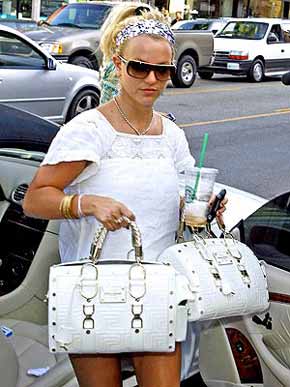
One bag’s just not enough!

britney_spears4.jpg

Britney Spears was caught double bagging it on Thursday during a shopping trip in Beverly Hills.

She’s actually carrying two matching Versace purses. One is for her cousin Alli Sims.

Britney is now preparing for the MTV VMAs. She’ll be kicking off the award show with a highly anticipated opening performance.

Share and Enjoy

  • Facebook
  • Twitter
  • Delicious
  • Digg
  • StumbleUpon
  • Add to favorites
  • Email
  • RSS

My new Partnership with The Find

I just added a new feature to this site. Do you see that shopping link in the top right hand corner of the page? Well, that will take you to my shopping page.

I’ve partnered with The Find. They contacted me, oh … at least two months ago, asking if I wanted to partner with them and offer some great shopping deals to my site visitors. I was interested from the start, but the opportunity came up at a very busy time for me and I was slow to get the ball rolling. In the meantime, the great people at The Find made it easier for me to get my sites listed and once that happened. I started the process last week, and earlier today I was told that all my sites were accepted.

The company made it easy to add shopping listings. You can visit the Shopping page of my site to see a selection of items or use the search at the top of that page to look for virtually anything you might want to buy. I’ve also added a shopping widget to my sidebar to catch your eye.

Now for the really cool stuff. I can add shopping links directly into my posts. I’m actually going to experiment here in this post so bear with me. For example if I were talking about the clothing a particular celebrity was wearing – say a pair of beautiful pumps, all I have to do is add a special link to the word and a search link for that product will be created.

I can even link in such a way that it will automatically add an image to my post and search link, or at least I hope it will. Remember I’m experimenting in this post. Say I was talking about pumps again, but wanted and image added I just have to add the word title in the special link. Easy – I hope! (ok well that didn’t work, but I’ll get it to work, I hope, as that will certainly add to my posts.)

I think I can create shopping links in a little more direct way by searching for specific products too.

Some of the new sites I’m working on will be very shopping oriented. Heck one site is called Shopping Maniac and the other is Home and Garden Diva. I’m sure my new partnership with The Find will come in quite handy when I reveal those sites and partner them with The Find. I mean, when I’m talking about a product I love to be able to show my readers and image. Whether you click on the link and buy the product is your choice, but the addition of the image and an easy linking system will be great for me – and I hope for you too.

Share and Enjoy

  • Facebook
  • Twitter
  • Delicious
  • Digg
  • StumbleUpon
  • Add to favorites
  • Email
  • RSS