• Technology
  • Sales and Marketing
  • Blogging
  • Site Maintenance
  • Making Money

WebStyle

Helpful tips, latest gadgets and News

  • Home
  • Blog
  • Archive
  • Links
  • Guest Blogger
  • About
  • Contact


You are here: Home / 2006 / Archives for October 2006

Archives for October 2006

Adding a blogroll to Typepad

by Tricia

I run some blogrolls of my own on my other sites and I’ve found that a number of people have no idea how to add a blogroll to their site. Even though I haven’t used all of the different types of blogging platforms I’ve learned from my blogroll members how they finally managed to add the code to their sidebar.

To make things easier for you I thought I’d post the instructions for Typepad users here.

Charles from Deuces Stay Wild figured out this one for us:

1. In TypePad, create a Notes typelist.

2. Name your list – perhaps “Wordless Wednesday” or whatever the name of the particular blogroll happens to be.

3. Next you click the “add new item” button

4. Then in the “notes” section you paste the blogroll code – that’s the code that begins with the word script.

5. Next you save the changes.

6. After saving your changes you must go to your edit design page

7. And then to change content selections

8. Once you are on the change content selections you select (check the check-box) your new typelist, which in this case is whatever you just named the new blogroll.

9. Save your changes and you are done!

I don’t use Typepad and as a result if you have further questions I won’t be able to answer them. Sorry. However, if you know of an easier way to add a blogroll to Typepad please feel free to tell me your method.


Filed Under: Blogging, Blogroll, How To, Site Maintenance Tagged With: add blogroll, add new item, adding blogroll to typepad, Blogroll, blogroll code, How To, instructions, name list, notes, paste, typelist, typepad

How to add a blogroll to B2Evolution

by Tricia

Apparently adding a blogroll to B2evolution is a pain in the hinny. I don’t use that blogging software myself, however one of my blogroll list members was kind enough to have helped me out by giving me the instructions.

The first thing that you need to do is got to your Admin area and click on the Templates tab.

  • Then you will need to select:
  • “_main.php – This is the main template. It displays the blog.”
  • Once you are on main.php, figure out where your sidebar is located in the coding. Look for the words “START OF SIDEBAR”
  • Scroll down until you reach the end of the Side Bar Coding which often ends with an href link to B2evolution and a B2evolution image link.
  • Hit enter twice after the end of the B2evolution link code which ends with an ending paragraph code < / p>
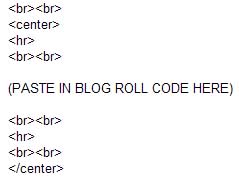
  • Then add the following code:

    b2evoinstr.jpg

  • Save your work at that point and check your page. You should have a blogroll or whatever else (image?) that you pasted into the sidebar code area.

NOTE: If you are using a custom design you will need to edit the _main.php file in the folder that contains your skin.

I hope that you’ve found this information helpful. Remember, I do not use B2evolution so I won’t be able to answer many questions on this if you have any. I’m just trying to be helpful.

Filed Under: Blogging, Blogroll, How To, Site Maintenance, Webdesign Tagged With: add blogroll, adding blogroll, B2B, B2B evolution, blog software, Blogroll, content, How To, instructions

  • « Previous Page
  • 1
  • 2

The 411 on me

Tricia P

Nurse and Blogger, Photographer and secret TV addict. Chocoholic, dog lover and gardener ... More about me.

  • Facebook
  • Instagram
  • Twitter


Categories

Sites to Visit


Eavestrough Cleaning Toronto

Recent Posts

  • What Should You Do If Google Labels Your Website As ‘Malware’?
  • How To Make Your Business Stand Out Online
  • Give Your Animal Website Some Life!
  • QR Codes and How They Can Work For You
  • Forum Plugins For WordPress
  • 4 Most Common Blogging Mistakes Made by Small Businesses
  • Why Internet Marketing Just WORKS

Recent Comments

  • Robert Gloster Web Design Limerick on Forum Plugins For WordPress
  • sightseeing in pattaya Thailand on Bad Behavior plugin blocks site administrators – plugin now updated to resolve problem
  • Ramu Konidena on How To Make Your Business Stand Out Online
  • Emma Fernandes on 4 Most Common Blogging Mistakes Made by Small Businesses
  • Hanna Alex on How To Make Your Business Stand Out Online

Subscribe

  • Full Entries RSS
  • Comments RSS

Read WebStyle in
your RSS Reader


Get the WebStyle
Newsletter by E-mail

and keep up with the latest posts. It's FREE.


Follow us on Twitter!

Shopping

Computers, electronics,
gadgets, Gifts and More!
At our Amazon store.

Tags

affiliate articles blog Blogger Blogging Blogroll computer content domain download Google How To instructions Internet marketing keyword link listed market marketing monetize money plugin popular posts problem products promote register search engine search engine optimization search engines SEO Software tech Technology traffic Video visitors web host webmaster website Wordpress wordpress plugin Writing Yahoo

Site Stuff

Visitors


Meta

  • Log in
  • Entries feed
  • Comments feed
  • WordPress.org

Pages

  • About
  • Archive
  • Become a Guest Blogger for WebStyle
  • Blog
  • Blogrolls
    • Canadian Bloggers
    • Do Follow Bloggers
    • Toronto Bloggers
  • Contact
  • Disclosure
  • Links
  • Our Sites
  • Privacy Policy
  • Resources

Search

Archives

Copyright © 2026 · Metro Pro Theme on Genesis Framework · WordPress · Log in