• Technology
  • Sales and Marketing
  • Blogging
  • Site Maintenance
  • Making Money

WebStyle

Helpful tips, latest gadgets and News

  • Home
  • Blog
  • Archive
  • Links
  • Guest Blogger
  • About
  • Contact


You are here: Home / Archives for content

Blog Flux

by Tricia

If you write a blog or any kind of website for that matter, I can’t stress how important it is to not only create good content for your site, but to promote your site by listing it in as many search engine listings, and directories as you can. The more listings you have the more visitors you’ll eventually get. This of course is of particular importance if you are trying to monetize your site. Visitors mean money – eventually.

One of the sites that I would recommend that you list your sites on is Blogflux. This site isn’t only a directory in which you should list your blog, it has a number of other features that you can put to good use on your site as well.

On the Blogflux site you’ll find:

  • A Button Maker – makes 80×15 or 88×13 buttons with a few clicks.
  • LinkLog – Track what links are being clicked on by your users, how often they are clicked, and what pages they are clicked from.
  • MapStats – The best way to keep track of your visitors. Not only does it provide the normal statistics found with other stat counter sites, it meshes up with Google Maps to show where your visitors are coming from.
  • PageRank Checker – Google’s PageRank is a way of ranking how important a site is. Check and show off your PR to your site’s visitors.
  • Pinger – Pinging other sites one by one can be a chore. Just enter two fields and hit submit to automatically ping a dozen sites.
  • Polls – Instantly create AJAX-driven polls that also let you map vote results to Google Maps.
  • Quick RSS Links – Reduce the clutter on your blog. Use blogflux’ link to provide users with quick links to various feed subscribers or email subscription option.
  • Scramble – Protect your email from spamming spiders. Javascript protection to foil them all.
  • Subscription Service – Keeping track of all your favorite blogs can be a hassle and time consuming. Get a daily email that lets you know which of your subscribed blogs have updated posts.
  • Suggest – Finding blogs that you want to read is not easy – too much noise out there! Blog Flux Suggest makes finding interesting blogs an easy and quick experience. Best of all – no spam
  • Themes – Find and download themes for all of the popular blog software packages.


Filed Under: Blog Directory, Site Promotion Tagged With: Blog Flux, blog software, blog themes, button maker, content, directory, good content, link log, mapstats, page rank, pinger, polls, promote, RSS, rss links, scramble email, search engine, Site Promotion, subscribe, suggest, theme

How to add a blogroll to B2Evolution

by Tricia

Apparently adding a blogroll to B2evolution is a pain in the hinny. I don’t use that blogging software myself, however one of my blogroll list members was kind enough to have helped me out by giving me the instructions.

The first thing that you need to do is got to your Admin area and click on the Templates tab.

  • Then you will need to select:
  • “_main.php – This is the main template. It displays the blog.”
  • Once you are on main.php, figure out where your sidebar is located in the coding. Look for the words “START OF SIDEBAR”
  • Scroll down until you reach the end of the Side Bar Coding which often ends with an href link to B2evolution and a B2evolution image link.
  • Hit enter twice after the end of the B2evolution link code which ends with an ending paragraph code < / p>
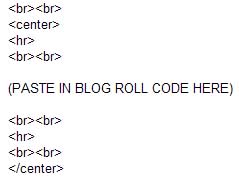
  • Then add the following code:

    b2evoinstr.jpg

  • Save your work at that point and check your page. You should have a blogroll or whatever else (image?) that you pasted into the sidebar code area.

NOTE: If you are using a custom design you will need to edit the _main.php file in the folder that contains your skin.

I hope that you’ve found this information helpful. Remember, I do not use B2evolution so I won’t be able to answer many questions on this if you have any. I’m just trying to be helpful.

Filed Under: Blogging, Blogroll, How To, Site Maintenance, Webdesign Tagged With: add blogroll, adding blogroll, B2B, B2B evolution, blog software, Blogroll, content, How To, instructions

DIY Search engine Optimization tips #2

by Tricia

Continued from DIY Search Engine Optimization Tips #1

6. When writing your articles or posts on your pages be sure to include important keywords and search phrases at the beginning, middle and end of the article.

If you are using good writing technique when composing your pages and articles you shouldn’t have a problem with this phase of SEO. As you might know, a well written article usually begins with a paragraph that describes what the body of the article will be about; the mid section of your article goes into more detail or greater depth regarding your initial statement in the first paragraph; the end of the article should come to a conclusion regarding the information you have discussed in the mid portion of the article.

Write naturally, but do remember to use terms within your post that might be used by people when they are searching for the type of information that your article contains.

7. Place your keywords and phrases in the link text of your web pages.

Keywords should be used in your links. When you are linking to another page or subpage on your site use a descriptive keyword or phrase to describe the clickable link. Don’t use terms like “click here” as that offers no description of what the link is for the search engines.

8. Make sure your site can be navigated easily by your visitors as well as search engines

When someone links to your site, or when you submit your site to a search engine it is often only the index page of the site that is given to the search engine. When the search engine visits your site it will index your main page. Your main page should contain some links that lead deeper into your site but if you have a javascript based navigation system the search engine spiders may not follow the links deep into your site as easily as if your links are text (html) based.

9. Build a site map page or use the Google sitemap option.

It’s important to get all of the pages on your site indexed by the search engines. Creating a page that contains links to all of the pages within your site, a sitemap, helps the search engine in this matter. As you probably know, visitors using your sitemap will be able to find items on your site easier as well.

You can create an xml version of your sitemap and submit it to Google Sitemaps. Google has links to third party XML sitemap creators in it’s Webmasters tools area. Once you’ve created your xml sitemap you can submit it to the sitemap area and google’s spiders will visit your site on a regular basis depending upon how often you update your site.

10. Off-site optimization

Now that you know how to optimize your site, and write articles and sub pages for search engine optimization you should concentrate on off site optimization. Google places a high measure of importance as to where you site is ranked on factors such as how many other sites link to your page, the page rank of the sites linking to your site, and the type of sites linking to your site.

The best way to get off site links of course is to create a website with valuable information that will make others want to link to you. If you exchange links with other sites try to exchange links with sites that are similar to your own. For example if you have a gardening site you should attempt to link up with other gardening sites – of all types.

You can also write informative articles and get them published on other websites which will result in a link back to your site. This may also help increase the amount of visitors coming to your site as well. Submit your links to all of the main directories- Google, Yahoo, MSN, the Open directory, and directories that are perhaps related to your sites genre as well. Participate in forums in order to promote your site and perhaps get more visitors to your site as well.

All of the tips that I have listed should help you promote your site and get better rankings on the main search engines.

Filed Under: How To, SEO, Site Maintenance, Site Promotion, Webdesign Tagged With: articles, body of article, clickable link, compose, conclusion, content, deep linking, detail, directory, DMOZ, easy navigation, exchange links, forums, good content, Google, Google sitemap, index, informative articles, initial statement, javascript based navigation, keywords, link text, listed, listing, mid section, MSN, naturally, navigate, off site, Open Directory, optimize, paragraph, phrases, posts, press release, promote, rank, ranked, robots, search engine optomization, search engine spiders, search phrases, SEO, similar sites, site map, spider pages, spiders, subpage, tips, valuable information, visitors, web design, web page, webmaster, webmaster tools, writing technique, XML, Yahoo

  • « Previous Page
  • 1
  • …
  • 4
  • 5
  • 6

The 411 on me

Tricia P

Nurse and Blogger, Photographer and secret TV addict. Chocoholic, dog lover and gardener ... More about me.

  • Facebook
  • Instagram
  • Twitter


Categories

Sites to Visit


Eavestrough Cleaning Toronto

Recent Posts

  • What Should You Do If Google Labels Your Website As ‘Malware’?
  • How To Make Your Business Stand Out Online
  • Give Your Animal Website Some Life!
  • QR Codes and How They Can Work For You
  • Forum Plugins For WordPress
  • 4 Most Common Blogging Mistakes Made by Small Businesses
  • Why Internet Marketing Just WORKS

Recent Comments

  • Robert Gloster Web Design Limerick on Forum Plugins For WordPress
  • sightseeing in pattaya Thailand on Bad Behavior plugin blocks site administrators – plugin now updated to resolve problem
  • Ramu Konidena on How To Make Your Business Stand Out Online
  • Emma Fernandes on 4 Most Common Blogging Mistakes Made by Small Businesses
  • Hanna Alex on How To Make Your Business Stand Out Online

Subscribe

  • Full Entries RSS
  • Comments RSS

Read WebStyle in
your RSS Reader


Get the WebStyle
Newsletter by E-mail

and keep up with the latest posts. It's FREE.


Follow us on Twitter!

Shopping

Computers, electronics,
gadgets, Gifts and More!
At our Amazon store.

Tags

affiliate articles blog Blogger Blogging Blogroll computer content domain download Google How To instructions Internet marketing keyword link listed market marketing monetize money plugin popular posts problem products promote register search engine search engine optimization search engines SEO Software tech Technology traffic Video visitors web host webmaster website Wordpress wordpress plugin Writing Yahoo

Site Stuff

Visitors


Meta

  • Log in
  • Entries feed
  • Comments feed
  • WordPress.org

Pages

  • About
  • Archive
  • Become a Guest Blogger for WebStyle
  • Blog
  • Blogrolls
    • Canadian Bloggers
    • Do Follow Bloggers
    • Toronto Bloggers
  • Contact
  • Disclosure
  • Links
  • Our Sites
  • Privacy Policy
  • Resources

Search

Archives

Copyright © 2026 · Metro Pro Theme on Genesis Framework · WordPress · Log in