• Technology
  • Sales and Marketing
  • Blogging
  • Site Maintenance
  • Making Money

WebStyle

Helpful tips, latest gadgets and News

  • Home
  • Blog
  • Archive
  • Links
  • Guest Blogger
  • About
  • Contact


You are here: Home / Archives for popular

Promote your site with a Squidoo lens

by Tricia

Have you heard of Squidoo? I’ve been a member of Squidoo since 2005, shortly after the site opened it’s doors to those who wanted to promote their websites in a very different way.

Squidoo allows members to make what they call a lens. A lens is a window to promote perhaps another sites or a number of similar sites on the internet. You can add as much information to your lens as you like in order to point others towards your website.

I made my first lens, as I said, back in 2005. It was for my reptile and amphibian care website
. I have information on that site about a lot of different reptiles but the majority is for one type of lizard – the water dragon. So what I did was to add snippets of care information to the lens that I created that lead to specific pages on my website where my lens visitors could learn even more in depth information about the care of the water dragon lizard. I did the same thing on another lens for iguana care.

I was also able to add modules to my lens that allowed me to select items from online stores like overstock.com, Amazon and many others for which, if I sold any items through my lens I’d get a percentage of the royalties that Squidoo made off the sale. Profits from a lens can also be donated to a number of charities as well.

I didn’t do much with my lens over the last year, but I’ve recently gone back and given them an overhaul adding new modules and updating the information.

As I said you can do as much or as little to your lens as you’d like. If you were to create one for your website you might add your RSS feed so that visitors could see your latest posts, as well as write a summary of what your site is about. You can also add link modules in order to link to similar types of sites.

I’ve now created lens for all of the blogs that my husband and I run. Each one has a summary of the blog, RSS feeds, links, shopping modules and I’ve added as many tags to the lenses as possible that describe the site accurately so that people will be able to find my lens easily on Squidoo or perhaps even via a search engine.

Visitors to your lens can rank your lens from one to five stars, so if you create a lens try to do a good job so that you’ll get a good rating. I believe the rating system helps with a lens popularity on the site as well.

The people as squidoo also send out newsletters telling members of popular lenses each day and you can apply to have your own lens promoted in order to get more visitors and ratings for your lens.

Check it out for yourself. At the very least it’s another way to promote your website and at the most it’s a way to make a little bit of extra money if your lens does well!

Visit Squidoo to make your own Lens.


Filed Under: Affiliates, How To, Sales and Marketing, Site Promotion, Site Traffic Tagged With: add rss feed, affiliate, Amazon, blog, create lens, feeds, get more visitors, How To, instructions, keyword, lenses to promote your site, member, members, online store, other sites, popular, posts, products, promote, Promote site, rank, search engines, summary of website, tags, website

Apple iphone to be released at end of June

by Tricia

Finally Apple has set a date for the release of the much anticipate Apple iPhone. The release date is set for June 29th and a flurry of ads and television commercials will be coming out soon to help promote the new mobile phone.

You can watch the video above to learn more about the Apple iPhone, it’s release, and how the company plans to promote their newest and likely to be highly popular mobile phone.

Filed Under: Electronics, Gadgets, Multimedia, Shopping and supplies, Technology, Video Tagged With: Apple, apple iphone, Cell phone, end of june, mobile, mobile phone, popular, release, Technology, Video

Exchange audio and video files from one handheld device to another

by Tricia

Earlier I spoke about the wide assortment of audio and video related software that can be downloaded from AVS4YOU. I’d just like to take a moment to tell you about one particular software product that I think you’ll find extremely useful.

I think I must be one of the few people in the world that has yet to buy an iPod. Isn’t that terrible? However, with iPods being all the rage these days I really do think that you will like using the AVS iDevice Explorer. You can do so many things with this software.

You can use the iDevice explorer to synchronize and exchange all of your favorite videos and songs between multiple ipods.

What if you want to exchange music and videos between other multimedia players and mobile devices?

You can.

This compact application will allow you to exchange files between popular products such as Sony PSP’s, Apple ipod, Samsung YP-T9, SanDisk Sansa e200 series players, Archos DVRAV500/AV700, 404/504/604, iRiver H10 player, Epson P-2000/P-4000, mobile phones for GSM and CDMA networks, and Portable Media Players (PMP).

You can exchange files between all of the above listed devices simply and easily without copying them to your computers hard drive.

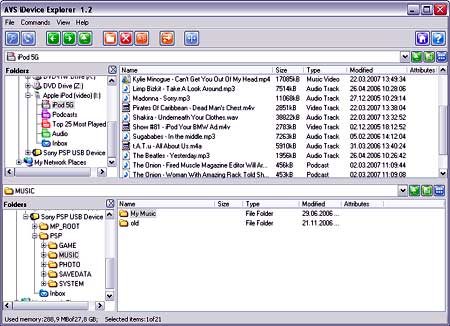
This screen shot shows how simple it is to view the files on one device and select them to be copied and or exchanged with those on another device:

ideviceexplorer.jpg

You can watch and manage the transfer of files from one device to another, as well as manage the file and folder structure on your portable device using the AVS iDevice software.

Another thing that I like about the AVS iDevice is that it supports cross-format conversion. What that means is that it will automatically convert a media file as it’s copying it from one device to another into the receiving handheld devices accepted or supported format.

You can use the standard USB connection, Bluetooth or IrDA to exchange files between mobile devices.

So how much does this great program cost?

Well, the AVS iDevice Explorer is part of the AVS4YOU.com package that I mentioned in an earlier post. For the low cost of $29 you can download and use all 27 software tools in the AVS4YOU.com package.

You’ll be able to download software, as well as get patches and upgrades during the year if you choose the $29 subscription package. If you purchase the $59 lifetime AVS4YOU package you’ll be able to download all of the AVS tools for an unlimited amount of time.

Read the AVS4YOU post that I wrote earlier and you can learn more about the 26 other AVS tools that will allow you to edit, convert and rip audio and video files, as well as create ringtones, burn DVD’s and a whole lot more.

I’m impressed with the line up of products that AVS has produced and I’m considering registering with AVS4YOU as I do quite a bit of audio and video editing for my websites.

Filed Under: Computer Software, Data Storage, Items to Try, Multimedia, Technology Tagged With: 27 tools, 29 dollars, 404 504 604, 59 dollars, Apple ipod, application, Archos DVRAV500 AV700, Audio, audio editing, AVS, AVS iDevice explorer, AVS tools, AVS4YOU, AVS4YOU.com, AVS4YOU.com package, Bluetooth, burn, CDMA, compact application, computer, content, convert, cross format, cross format conversion, device, download, DVD, edit, Epson P 2000 P 4000, exchange, exchange media files, favorite, GSM, handheld devices, iDevice explorer, iPod, IrDA, iRiver H10 player, listed, manage, manage files, manage folders, mobile, mobile devices, mobile phones, MP3, Multimedia, multimedia players, multiple iPods, music, networks, no copying, patches, PMP, popular, popular products, Portable Media Players, register, registration, ringtone, ringtones, rip, Samsung, Samsung YP T9, SanDisk Sansa e200 series players, screen shot, Software, songs, Sony PSP s, subscription, support, supports, synchronize, transfer files, unlimited, upgrades, USB, Video, video editing, videos, website

  • « Previous Page
  • 1
  • 2
  • 3
  • Next Page »

The 411 on me

Tricia P

Nurse and Blogger, Photographer and secret TV addict. Chocoholic, dog lover and gardener ... More about me.

  • Facebook
  • Instagram
  • Twitter


Categories

Sites to Visit


Eavestrough Cleaning Toronto

Recent Posts

  • What Should You Do If Google Labels Your Website As ‘Malware’?
  • How To Make Your Business Stand Out Online
  • Give Your Animal Website Some Life!
  • QR Codes and How They Can Work For You
  • Forum Plugins For WordPress
  • 4 Most Common Blogging Mistakes Made by Small Businesses
  • Why Internet Marketing Just WORKS

Recent Comments

  • Robert Gloster Web Design Limerick on Forum Plugins For WordPress
  • sightseeing in pattaya Thailand on Bad Behavior plugin blocks site administrators – plugin now updated to resolve problem
  • Ramu Konidena on How To Make Your Business Stand Out Online
  • Emma Fernandes on 4 Most Common Blogging Mistakes Made by Small Businesses
  • Hanna Alex on How To Make Your Business Stand Out Online

Subscribe

  • Full Entries RSS
  • Comments RSS

Read WebStyle in
your RSS Reader


Get the WebStyle
Newsletter by E-mail

and keep up with the latest posts. It's FREE.


Follow us on Twitter!

Shopping

Computers, electronics,
gadgets, Gifts and More!
At our Amazon store.

Tags

affiliate articles blog Blogger Blogging Blogroll computer content domain download Google How To instructions Internet marketing keyword link listed market marketing monetize money plugin popular posts problem products promote register search engine search engine optimization search engines SEO Software tech Technology traffic Video visitors web host webmaster website Wordpress wordpress plugin Writing Yahoo

Site Stuff

Visitors


Meta

  • Log in
  • Entries feed
  • Comments feed
  • WordPress.org

Pages

  • About
  • Archive
  • Become a Guest Blogger for WebStyle
  • Blog
  • Blogrolls
    • Canadian Bloggers
    • Do Follow Bloggers
    • Toronto Bloggers
  • Contact
  • Disclosure
  • Links
  • Our Sites
  • Privacy Policy
  • Resources

Search

Archives

Copyright © 2026 · Metro Pro Theme on Genesis Framework · WordPress · Log in