• Technology
  • Sales and Marketing
  • Blogging
  • Site Maintenance
  • Making Money

WebStyle

Helpful tips, latest gadgets and News

  • Home
  • Blog
  • Archive
  • Links
  • Guest Blogger
  • About
  • Contact


You are here: Home / Archives for unlimited

Bill Collector in a Box makes it easy for small business to manage debtors

by Tricia

If you own a small business and you’ve been frustrated with the process of trying to collect money from clients who owe you money you might be interested in Bill Collector In A Box by Marauder Corporation. This debt collection software has been created especially for small businesses.

Bill Collector in a Box assists small business owners with the tools to collect debts without the assistance of an attorney or an outside collection agency. Small businesses that use this software will no longer find themselves selling overdue accounts to debt collection agencies as they’ll be able to manage the debt with the help of Bill Collector in a Box.

This software is suitable for any type of merchant from landlords to auto service, doctors, dentists – any kind of business. It’s meant to take the hassle out of bill collection.

You can send an unlimited amount of debt specific collection letters directly from Bill Collector in a Box. There are pre-formulated letters for any kind of debt and all of the letters have been viewed by an attorney to ensure that the information within each letter is legal.

Nationwide Capital Recovery will handle your debtors for you when you use the 1 Click Credit Reporting feature. Any creditor can report an outstanding debt to the credit bureaus for 7 years. Just with one click. Included in this feature is a demand letter from the supporting collection agency, Nationwide Capital Recovery, along with a payment stub and payment envelope addressed to the small business that the debtor owes.

Nationwide Capital Recovery has a full range of debt collection services and in conjunction with their services a small business will have success in securing payment on their overdue accounts quite quickly.

If a client passes a bad check the check writer can easily be reported to the Shared Check Authorization Network. It costs $5 to report a bad check writer to the database and once a business does this the information regarding their debt will be in the database for five years. This means that unless they remit payment to the business for the debt they owe they will get a message every time they try to write a check or open a new bank account at one of the 70,000 Shared Check Authorization Network locations. The message will let them know that they won’t be removed from the database until they pay their debt. There are many large retailers and banks within this network so that $1.50 will be well spent as it should cause the debtor quite a bit of trouble.

The software also makes it easy to manage contacts. There are two levels of skip tracing that will assist as small business in locating customers that have relocated.

The Basic Skip feature will assist small business owners with the collection of the debtors most recent address and place of employment by gathering information from the debtors credit file. It also lists up to three phone numbers.

The Advanced Skip feature provides a small business with a report on their debtor that includes the clients names, date of birth, social security number, home address and any other residential listings, home work and cell phone numbers, criminal, property and bankruptcy information and the names addresses and phone numbers of up to 10 relatives of the debtor. All of this information is manually verified by a private investigator and returned to the small business owner by email.

This invaluable software can be purchased for $99. Accounts that are forwarded to the collection agency, Nationwide Capital Recovery, will have a 38% commission applied to all amounts collected. Having said that, Nationwide Capital Recovery states that if their product doesn’t pay for itself at least twice in the first year they will refund the entire purchase cost of the software. That makes the software certainly worth a try. Small businesses can stop writing off outstanding debts and start collecting some of the money that they are owed.



Filed Under: Computer Software, Finance, Great Sites, Sales and Marketing, Shopping and supplies, Software, Technology Tagged With: 1 click, account, attorney, bad check, bill collector, business, Cell phone, clients, collection, collection agency, contacts, credit reporting, debt, debt letters, debtor, features, listing, manage, manage contacts, merchants, money, Nationwide Capital Recovery, private investigator, reports, service, shared check authorization network, skip trace, small business, Software, unlimited, verified, Writing

Exchange audio and video files from one handheld device to another

by Tricia

Earlier I spoke about the wide assortment of audio and video related software that can be downloaded from AVS4YOU. I’d just like to take a moment to tell you about one particular software product that I think you’ll find extremely useful.

I think I must be one of the few people in the world that has yet to buy an iPod. Isn’t that terrible? However, with iPods being all the rage these days I really do think that you will like using the AVS iDevice Explorer. You can do so many things with this software.

You can use the iDevice explorer to synchronize and exchange all of your favorite videos and songs between multiple ipods.

What if you want to exchange music and videos between other multimedia players and mobile devices?

You can.

This compact application will allow you to exchange files between popular products such as Sony PSP’s, Apple ipod, Samsung YP-T9, SanDisk Sansa e200 series players, Archos DVRAV500/AV700, 404/504/604, iRiver H10 player, Epson P-2000/P-4000, mobile phones for GSM and CDMA networks, and Portable Media Players (PMP).

You can exchange files between all of the above listed devices simply and easily without copying them to your computers hard drive.

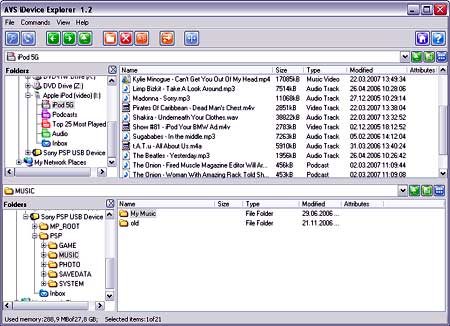
This screen shot shows how simple it is to view the files on one device and select them to be copied and or exchanged with those on another device:

ideviceexplorer.jpg

You can watch and manage the transfer of files from one device to another, as well as manage the file and folder structure on your portable device using the AVS iDevice software.

Another thing that I like about the AVS iDevice is that it supports cross-format conversion. What that means is that it will automatically convert a media file as it’s copying it from one device to another into the receiving handheld devices accepted or supported format.

You can use the standard USB connection, Bluetooth or IrDA to exchange files between mobile devices.

So how much does this great program cost?

Well, the AVS iDevice Explorer is part of the AVS4YOU.com package that I mentioned in an earlier post. For the low cost of $29 you can download and use all 27 software tools in the AVS4YOU.com package.

You’ll be able to download software, as well as get patches and upgrades during the year if you choose the $29 subscription package. If you purchase the $59 lifetime AVS4YOU package you’ll be able to download all of the AVS tools for an unlimited amount of time.

Read the AVS4YOU post that I wrote earlier and you can learn more about the 26 other AVS tools that will allow you to edit, convert and rip audio and video files, as well as create ringtones, burn DVD’s and a whole lot more.

I’m impressed with the line up of products that AVS has produced and I’m considering registering with AVS4YOU as I do quite a bit of audio and video editing for my websites.

Filed Under: Computer Software, Data Storage, Items to Try, Multimedia, Technology Tagged With: 27 tools, 29 dollars, 404 504 604, 59 dollars, Apple ipod, application, Archos DVRAV500 AV700, Audio, audio editing, AVS, AVS iDevice explorer, AVS tools, AVS4YOU, AVS4YOU.com, AVS4YOU.com package, Bluetooth, burn, CDMA, compact application, computer, content, convert, cross format, cross format conversion, device, download, DVD, edit, Epson P 2000 P 4000, exchange, exchange media files, favorite, GSM, handheld devices, iDevice explorer, iPod, IrDA, iRiver H10 player, listed, manage, manage files, manage folders, mobile, mobile devices, mobile phones, MP3, Multimedia, multimedia players, multiple iPods, music, networks, no copying, patches, PMP, popular, popular products, Portable Media Players, register, registration, ringtone, ringtones, rip, Samsung, Samsung YP T9, SanDisk Sansa e200 series players, screen shot, Software, songs, Sony PSP s, subscription, support, supports, synchronize, transfer files, unlimited, upgrades, USB, Video, video editing, videos, website

Get video and audio conversion and editing software at AVS4YOU

by Tricia

avs4you_logo.gif

The following is a post for AVS4YOU, a website that is owned and operated by Online Media Technologies LTD.

When I visited the AVS4YOU website I was pleased to see that this company offers software for digital video and multimedia processing. This company specializes in developing innovative video and audio solutions for professional developers and high end-users. All of their software tools are designed to make your work with audio and digital video smooth, effective and professional in quality.

I think this website and the software products available would be especially useful to those who create video or audio broadcasts for their websites, and those who want to personalize their mobile phones and multimedia players. There is a large variety of software products on the AVS4YOU site that will assist you in editing, converting or producing high quality video or audio files.

When you visit the site you can use the category menu on the left to look at the software that can be downloaded for Video, Audio, Burning, and Mobile phones. You’ll also find links to product guides and online help.

Just to give you an idea of the type of software products available to you at AVS4YOU:

Video Related Software:

Using the video related products available to you at AVS4YOU you can edit and convert video, watch, capture and record video directly from your television, VHS, camcorder, satellite or cable source, convert video for multimedia players, as well as play DVD and audio recordings on your computer. The products that can help you do all this are the AVS video converter, AVS video editor, AVS video remaker, AVS video to go, AVS TV box, AVS capture wizard, AVS DV to DVD, AVS video to ipod, AVS video to PSP, AVS video to Archos, and the AVS DVD player.

Audio Related Software:

Similar software programs are available for audio as well. There are programs that will allow you to edit, convert, record and listen to audio on your computer or multimedia player. Software available for these functions are the AVS audio converter, AVS audio editor, AVS ringtone maker, AVS music mix, AVS audio to ipod, AVS audio CD grabber, AVS MP3 disk creator, AVS audio recorder, AVS iradio recorder and the AVS CD creator.

Additional Software:

There are additional software programs available for uploading digital media to mobile phones, and burning and copying DVDs and CDs.

Sounds like a great deal

I’m actually quite amazed over the quantity of software programs available through AVS4YOU. There’s no excuse now for not being able to convert those old digital home movies over to DVD.

Now, I didn’t download every single program available through the site, but it appears that you can download a trial version of each program that will offer all of the features of the full version but only work for a limited time.

Register with AVS4YOU and you’ll be able to download, use and install all of the software available through the site using just one serial number. It’s like paying for one product and getting the rest absolutely free.

There are two types of subscriptions that you can choose from. A 1 year subscription with AVS4YOU costs $29, and an unlimited access subscription costs only $59.

As I understand it, if you purchase a one year subscription you’ll be able to download all of the software available on AVS4YOU throughout that 1 year period, as well as any upgrades or patches that come out during that time. If you choose the unlimited subscription you’ll be able to do all of the above for an unlimited period of time.

Frankly I think both subscription packages are excellent deals since I can picture pretty much everyone having a need for at least one of the programs available through AVS4YOU at one point or another.

Filed Under: Computer Software, Items to Try, Multimedia, Shopping and supplies, Technology, Video Tagged With: Audio, AVS, AVS audio CD grabber, AVS audio converter, AVS audio editor, AVS audio recorder, AVS audio to ipod, AVS capture wizard, AVS CD creator, AVS DV to DVD, AVS DVD player, AVS iradio recorder, AVS MP3 disk creator, AVS music mix, AVS ringtone maker, AVS TV box, AVS video converter, AVS video editor, AVS video remaker, AVS video to Archos, AVS video to go, AVS video to ipod, AVS video to PSP, AVS4YOU, burn, burning, CD, clone, content, convert, copying, download, DVD, edit, editing, limit, menu, mobile, offers, Online Media Technologies, products, record, recording, register, registration, ringtone, Software, subscription, tech, trial, unlimited, upload digital media, Video, website

The 411 on me

Tricia P

Nurse and Blogger, Photographer and secret TV addict. Chocoholic, dog lover and gardener ... More about me.

  • Facebook
  • Instagram
  • Twitter


Categories

Sites to Visit


Eavestrough Cleaning Toronto

Recent Posts

  • What Should You Do If Google Labels Your Website As ‘Malware’?
  • How To Make Your Business Stand Out Online
  • Give Your Animal Website Some Life!
  • QR Codes and How They Can Work For You
  • Forum Plugins For WordPress
  • 4 Most Common Blogging Mistakes Made by Small Businesses
  • Why Internet Marketing Just WORKS

Recent Comments

  • Robert Gloster Web Design Limerick on Forum Plugins For WordPress
  • sightseeing in pattaya Thailand on Bad Behavior plugin blocks site administrators – plugin now updated to resolve problem
  • Ramu Konidena on How To Make Your Business Stand Out Online
  • Emma Fernandes on 4 Most Common Blogging Mistakes Made by Small Businesses
  • Hanna Alex on How To Make Your Business Stand Out Online

Subscribe

  • Full Entries RSS
  • Comments RSS

Read WebStyle in
your RSS Reader


Get the WebStyle
Newsletter by E-mail

and keep up with the latest posts. It's FREE.


Follow us on Twitter!

Shopping

Computers, electronics,
gadgets, Gifts and More!
At our Amazon store.

Tags

affiliate articles blog Blogger Blogging Blogroll computer content domain download Google How To instructions Internet marketing keyword link listed market marketing monetize money plugin popular posts problem products promote register search engine search engine optimization search engines SEO Software tech Technology traffic Video visitors web host webmaster website Wordpress wordpress plugin Writing Yahoo

Site Stuff

Visitors


Meta

  • Log in
  • Entries feed
  • Comments feed
  • WordPress.org

Pages

  • About
  • Archive
  • Become a Guest Blogger for WebStyle
  • Blog
  • Blogrolls
    • Canadian Bloggers
    • Do Follow Bloggers
    • Toronto Bloggers
  • Contact
  • Disclosure
  • Links
  • Our Sites
  • Privacy Policy
  • Resources

Search

Archives

Copyright © 2026 · Metro Pro Theme on Genesis Framework · WordPress · Log in